wp clock full – Free Amazon Appstore App 8/19/11

Name: wp clock full

Description:

Your wallpaper can look good and still be useful. Display the day, date, time, WiFi service set identifier, and battery status boldly across a background of your choice. Get what you need at a glance and like what you see.

Love the Way It Looks
Using the sliding color scales, create the precise font color you desire. Add an outline for additional flair, and choose its color, opacity, and thickness. An endless array of background choices enhance the personalized and polished finish of the wallpaper. Select or create a color using the apps sliding color scale, or use any background image from your device or the Internet. Play a slideshow of images from a selected directory for a varying duration- -yep, you can pick that too.

Appreciate Its Purpose
Conveniently display what you want, how you want. Down to the details, wp clock full offers a variety of ways to personalize the format. It supports both 12- and 24-hour clock modes. Using checkboxes or dropdown menus, determine what to include on your screen, including clock position, time format, battery status, operator name, and more. It’s a simple app, offering useful information in an aesthetically pleasing package.

Some “Best of the Best” accessories for your Android phone:

App 2 SD Pro – Free Amazon App of the Day 8/18/11

Name: App 2 SD Pro

Description:

Imagine if you had to manually open and delete each junk e-mail from your inbox. Just the thought may make you invariably grateful for those little checkboxes and the mass-delete option. Digital is great; streamlining digital is better. App 2 SD Pro does what your phone can already do, but it does it better by streamlining a manual process.

If you’re app happy, you’ve got a lot of apps that take up internal space and slow down your phone. Moving apps from your internal storage to your SD card is the remedy. Taking the time to do it is the problem, unless you’ve got App 2 SD Pro.

…If You’re Phone Savvy
Your phone is moving at a snail’s pace, so you venture into your settings, check your available internal storage and SD storage space, and move capable apps to your SD card to free up a little space on your phone. The problem with this method is that all apps aren’t capable of SD card storage, so you have to manually check each app.

…And If You’re Not
The Better Way
Stop Hunting for SD Card Capable Apps
Apps with SD card capability are alphabetically listed under the Movable tab in the App 2 SD Pro interface. The Android OS does not do this for you. View the app icon, name, and file size. Tap the app to view data, code, and to open or uninstall the app. Clear the cache, or choose the Clear Cache option from the menu to clear them all.

Choose to move an app to the SD card individually, or choose the Move All option from the menu. Badda bing, badda boom, declare internal space restored!

You can also enable App to SD Pro to send a notification when you install an app that can be stored on your SD card.

A Snazzy Interface, to Boot
Three tabs provide you complete app management: Movable, On SD card, and Phone Only. Movable and SD Card apps can be moved between your SD card and internal storage easily. Phone Only apps are non-movable. Each tab provides you the total space used and available space.

Not only does App 2 SD Pro offer a handy functionality to make your life a little easier, but it looks pretty cool too. The wood and steel graphics add an aesthetic appeal so often lacking in utility apps. There’s nothing wrong with cleaning up and looking good while doing it.

Some “Best of the Best” accessories for your Android phone:

Overkill – Free Amazon App of the Day 8/17/11

Name: Overkill

Description:

Fly your ship through asteroid fields and waves of enemies to collect, upgrade, and destroy in Overkill. A side-scrolling shooter full of pure adrenaline-pumping action, Overkill puts an AI-guided spacecraft with responsive tilt controls at your disposal to help you defeat thousands of foes, earn high scores, and share those scores via online leaderboards.

Objective
Fight through enemy forces and challenging bosses, destroying anything that gets in your way to earn points and money. Occasional secondary objectives help keep gameplay varied, while you use the money earned to return to your hangar and upgrade your three weapon categories (cannons, rockets, and heavy weapons) in order to eradicate enemies and debris more efficiently. You also collect power-ups like rapid fire and double damage for increased destructive power.

Gameplay Modes
Start a new game and get into the main campaign, which is narrated by your ship’s AI. Or jump into one of several quick missions and bonus missions reflecting the campaign’s objectives in stand-alone form. You can even play survival mode if you’re up for a high score challenge. In the campaign you can select from four different difficulty levels for a variety of experiences: easy, normal, hard, and extreme.

Score Submission
At the end of each level, submit your score to the Scoreloop leaderboards with a Scoreloop login or a unique player ID. This widely used system lets you find out your rank for the last 24 hours, among players worldwide, or among your friends.

Additional Features
-Autosave when backing out of the game or exiting to your home screen
-Set controls to use the accelerometer or the touchscreen and keypad, trackball, or directional pad
-Tweak control sensitivity, sound effects, and music
-Increase the graphical filtering and detail if your phone has more powerful hardware
-Expect new levels, weapons, and power-ups to be added in future updates

Some “Best of the Best” accessories for your Android phone:

Trip Journal – Amazon Free App of the Day 8/16/11

Name:Trip Journal

Description:

A Multimedia Travelogue
Trip Journal enables you to capture your vacation and travel experiences and share them with your friends and family in real time. Use the application’s built-in GPS and compass to track your route, progress, location, even altitude. Take your travel photos and videos from your mobile using Trip Journal, and record them with your travel notes as you go. Share your travel experiences day-by-day and your completed travelogue using Trip Journal’s built-in links to Facebook, Google Earth, Trip Journal, Picasa, Flickr, Youtube, and Twitter.

Your Navigator and Record-Keeper
Trip Journal functions as your navigator and record keeper, always there to keep you oriented and on course, and to document your progress. You can check you current position at any time by tapping the “Locate on map” icon; both map and satellite views are available. Tap the compass icon not only to confirm the direction you’re moving in, but to see how your trip is progressing. Look at the top of the screen to find the distance you’ve traveled and the time that’s elapsed since the start of your trip, your average speed over the course of the journey, and the minimum and maximum altitudes you’ve reached.

Capture Your Experiences
Record your experiences as you go, through photos, video, and notes. To snap up important moments while they’re happening, choose “Capture media,” and start recording stills and video. These are automatically saved to your trip album. Record thoughts and impressions about your experiences as journal notes on the vintage notepaper template under “Write a note.” Whenever you review or share your trip album, these notes, images, and videos will be included.

Bring Your Readers Along with You
Trip Journal also makes it easy to share your travel experiences. The app includes built-in links to Facebook, Google Earth, Trip Journal, Picasa, Flickr, Youtube, and Twitter that you can use to instantly upload your routes, photos, video, notes, and more. Embed your trip in your blog to bring all of your followers along on your journey. And, when you’ve completed your trip, you have a complete, ready-made Trip Journal album to keep and share, preserving the whole adventure.

• Compiles ready-made, multimedia journal album as you go
• Supports blog updates and embedding
• Supports Android’s Froyo mobile platform.

Some “Best of the Best” accessories for your Android phone:

Everlands – Free Amazon Android App for 8/15/11

Name: Everlands

Description:
Story-Based, Hexagon-Shaped, Strategy Puzzle
Dark and sinister forces have invaded the colorful world of Everlands. Everlands animals must unite to combine the best of their abilities, together standing against the great threat that casts a shadow over their beloved homeland.

Each animal has unique strengths, weaknesses, and features. Defeat the foes of Everlands through strategy and tactics by combining dozens of animal abilities, leading them through more than 20 carefully prepared levels. Reveal the truth behind the source of mysterious evil in a unique turn-based game.

Game Objective
The goal of the game is to win battles by capturing as many enemy hexagons as possible with the strengths and abilities of your animal hexagons. If you manage to gain more than half of the combatants in that round, you win the battle.

Animal Hex health and attack power levels
Strategic Gameplay
Click on each animal hexagon to see useful information about that animal’s abilities. Based on that description, you place that hexagon on the board to prepare for battle against the enemy. Keep in mind the number and direction of the attack sides of each hex. The sides of your animal’s hex that have no attack direction are undefended. Those are the sides the enemy will try to attack. Ideal placement allows your animal to point its attack in the enemy’s direction, while leaving its undefended sides away from the battle’s front.

Social Networking Features
Invite, challenge and compete with your Facebook friends
Share your achievements on your Facebook wall
Facebook single sign-on support

Some “Best of the Best” accessories for your Android phone:

Free Apps for 8/14/11 (Amazon and GetJar.com) Memory Booster/TuneIn Radio Pro

So today’s Free apps are going to get posted together, mainly because the (Amazon) one isn’t worth a post of it’s own. From Amazon we have Memory Booster Ad-Free, and from GetJar.com we have TuneIn Radio Pro.

First up (Remember to read THIS article about task killers):

Name: Memory Booster Ad-Free

Description:
Memory Booster is a powerful mobile memory and RAM boosting tool specially designed for Android smartphone users. The app increases your phone’s performance by making more memory available for both your applications and your phone’s mobile operating system.

How it Works
Memory Booster helps your phone run at optimum efficiency by defragmenting your phone’s memory, recovering memory leaks from less efficient applications, and flushing unused libraries, among other nifty memory saving tricks. Your favorite games and applications will run faster and more efficiently with Memory Booster running in the background.

Features
Memory Booster provides a live chart to demonstrate your device’s total and free memory, and current memory usage. With Auto Boost Threshold set, Memory Booster keeps your memory higher than the desired level, and acts immediately if memory drops down. Besides automatic memory boosting, Memory Booster also allows you to manually boost your memory by Quick Boost. Other features include embedded Task Killer, Whitelist Manager, Boost Level Manager and Memory Boost Log, which assist Memory Booster to perform more efficiently and friendly.

Next we have an incredible radio app. Possibly the best out there for internet radio.

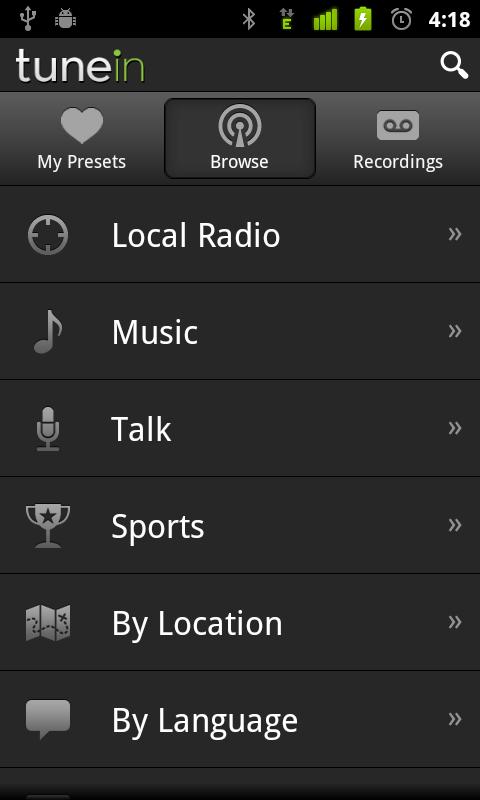
Name: TuneIn Radio Pro

Description:
Radio live, local, and beyond.

Enjoy the largest selection of radio in the world, now with more than 50000 stations streaming live. You’ll find hundreds of music formats, talk personalities, national networks like BBC, NPR and SWR, podcasts, live sports, news, weather, even scanners.

Some “Best of the Best” accessories for your Android phone:

Flick Kick Football – Free App of the Day from Amazon

Name: Flick Kick Football

Description:
Hear the roar of the crowd as you curve a beautiful strike past the wall of defenders….Gooooooal! Flick Kick Football delivers the thrill of taking free kicks on the goal: make your shot from different angles and distances, and watch out for shifting defenders and the goalie. Choose from Arcade, Time Attack, Practice, or Bullseye Mode, then use the intuitive flick controls to begin playing right away. Easy to pick up but hard to master, this classic time-killer is sure to appeal to casual gamers and die-hard soccer fans alike.

Curve your shots past the wall of defenders.
Gameplay
In Flick Kick Football, players assume the role of a striker taking shots on the goal. Pick one of four different game modes: Practice, Bullseye, Arcade, or Time Attack, and try out Flick Kick Football’s intuitive control system to begin making kicks like a pro.

To make a kick, simply line your finger up with the ball and flick the touchscreen in the direction of the goal. Not every kick is straightforward though: experiment with curving left or right in your followthrough, or give a longer swipe to kick the ball further. Find the technique that works for you, then adjust each kick to account for gaps in the opposition’s defense.

Challenging Conditions
Learn to curve your shots past defenders and the goalie: to add to the difficulty, some players will shift their positions constantly to throw off your aim. Try to target the corners of the net–referred to as the “skill zones” in the game–to increase your chance of scoring and earn additional bonuses.

Online Scores and Achievements
Flick Kick Football features online leaderboards and achievements with OpenFeint support. Rack up the points and then post your newest scores to Flick Kick’s global leaderboards. Think you’re good? Show off your skills online as you compete against others for the top spot!

Multiple Game Modes:
Bullseye
Test your aim with a series of bullseye targets lined up inside the goal. You will need to concentrate to make every shot count as you try to rack up the points before time runs out. Aim for the center of each target to score additional points and get awarded bonus time.

Arcade Mode
Fight to stay calm under pressure in this sudden death-styled goal shootout: one missed goal and it’s game over! Your only chance for survival is to try to aim for the “skill zone” edges of the goal: gain up to four extra lives this way.

Time Attack
It’s a race against the clock in this quickfire flick kicking challenge. How many goals can you score in only two minutes? As each successful goal adds on bonus time, you’ll have to keep cool and maintain steady aim to rack up a new highscore.

Multiplayer
Go head to head against friends through Flick Kick Football’s pass-and-play multiplayer mode. Take turns passing the Android device between players after each shot: the first player to miss the goal three times loses.

Skillshot
A true test for the Flick Kick Football pros: how many times can you shoot the ball into the Skill Zones in a minute?

Key Features
*Simple and intuitive flick controls make it easy to pick up and begin play
*Challenging gameplay with moving defenders and target distances
*Loading screens with famous soccer quotes and trivia
*3D graphics and a zooming, slow-motion “goal camera” add to the excitement
*Play against your friends using Flick Kick Football’s pass-and-play multiplayer mode
*Upload scores through OpenFeint online scoring and achievements

Some “Best of the Best” accessories for your Android phone:

WiFi File Explorer PRO – FREE Amazon Appstore app for 8-12-11

Name: WiFi File Explorer PRO

Description:
Access a Wi-Fi connection and manage your files

If you’ve ever needed to access a file from your phone (a photo, for example, or a song you like) but don’t have a cable to connect the phone to a computer, WiFi File Explorer PRO can make it happen. This Android app allows you to browse, download, and stream information–as well as manage your files–from your phone directly to a computer using a Wi-Fi connection and password-protected Web browser.

Untether Yourself

Setup for WiFi File Explorer PRO is simple and easy. When you open the app, it automatically detects nearby Wi-Fi networks and supplies you with a URL address to enter into the Web browser of your computer. You’ll also be prompted to enter a password (which you will create when you first begin using the app).

Once your phone is connected to the Wi-Fi network, it’s easy to go to the computer (which must also be connected to the network) and access the Web address. You’ll find that your phone’s files are there to be browsed, downloaded, or even streamed whenever you wish.

In this PRO version, you can also upload, sync, delete, copy, and zip or unzip all the files on your Android phone and computer, which makes it a great overall file manager.

A free version of this app, simply called WiFi File Explorer, is available as well. It offers similar but less robust features.

“I wholeheartedly recommend going the wireless route with WiFi File Explorer!” – Paul Jickling, PC World

Download Link: http://goo.gl/JbpHG (Amazon.com)

Some “Best of the Best” accessories for your Android phone: