Alternatives to the Android Market

So you have an Android phone that you want to be able to make your own, or you may feel a little restricted by Google’s Android Market.  What other options are out there?  I do a lot of talking and linking to things in Android Market, but I also talk and link a lot about the Amazon Appstore. The Amazon Appstore (among others – see below) is an alternate place to download apps for Android and along with the below list gives you the freedom to get your apps from anywhere.

I will cover a handful of app stores below. Feel free to check them out and comment about your experiences.

Name: SlideME App Store
Description:
SlideME is a great alternative to the Google Android Market, and is the site that has made recent (geek gamer) news because of the user yongzh getting booted out of Google’s market and pulling all of his apps and moving over to SlideME and releasing them for free. He is the author of the (insert-classic-system-here)OID games like, NESOID, SNESOID, GameBoid. Just for those apps alone you should go check out the SlideME appstore.
Download Link: http://goo.gl/P8VoU (SlideMe.org)

Name: AndSpot.com
Description:
AndSpot takes a unique approach to the idea of an app store. One that all you power users out there will love. They have a monthly service that gives you UNLIMITED Android app downloads for a low low monthly rate of $8 per month. It is in Beta so you have to sign up for it and wait to get an invite.
Download Link: http://goo.gl/2EEMd(AndSpot.com)

Name: Aproov
Description:
Aproov is a web based app “store” that specializes is only Free apps. This is great if you are someone that spends a lot of time looking through the regular market’s free section and struggle with it because it is not designed for just free apps, where this app store is designed just for that.
Download Link: http://goo.gl/Y930E (Aproov.com)

Name: OnlyAndroid (Mobihand.com)
Description:
OnlyAndroid is an app store that has an option that is similar to the Amazon Appstore. It offers a “deal of the day” on an android app or service. Although it is not a free app, but it also does include services, for example the deal for today (7/29/11) is a 15 month subscription to the SmrtGuard service which gives you data backup and a lost phone finder service for 50% off. It is definitely a site to keep tabs on because they might offer a great deal on that certain app you have been eyeing.
Download Link: http://goo.gl/kNGYB (onlyandroid.mobihand.com)

Name: Amazon App Store
Description:
Amazon Appstore is the alternative appstore that I am obviously a huge fan of mainly because of the feature they offer every day that gives you a FREE app that you can just download. No strings attached. They have a great selection of apps and almost all of the apps have a sale price that is cheaper than the “normal” Android Market.
Download Link: http://goo.gl/BRkOt (Amazon.com)

Some “Best of the Best” accessories for your Android phone:

Apps Not “Approved” For Your Phone

For the final (for now) portion of the “Why Root” series I will discuss some other apps that are only available on a device that is rooted. Well they may be listed on here as “only available”, keep in mind that they may be install-able on a non-rooted phone but they probably won’t work, or do anything at all.

Name: Superuser
Description:
Superuser is the main app that allows you to grant Superuser rights on your phone. Any of the apps on this page, or any app that requires root will need your permission to use the seperuser ability. This app allows you to save that permission and remember it for the next time you use the app.
It is preloaded on a majority of the roms and root packages out there, but just incase it isn’t you can get it for free on the Android Market. The barcode and links on this page link directly to the Market page, so they will work on your computer or phone.
From the Developer:
Grant and manage Superuser rights for your phone.
This app requires that you already have root, or a custom recovery image to work.
Note: App and binary will have different versions. The app is updated more often than the binary is.
Install fixed for CM6 Stable
If install fails, check http://bit.ly/su2xx for a solution
Download Link: http://goo.gl/kcbX2 (Android Market)

Name: Titanium Backup
Description:
This is the first app I install after a reset or flashing a new rom. It allows you to backup your apps, mass move your apps to the memory card, and much much more.
From Developer:
EXTREMELY powerful tool. Backup ALL apps, Market links, remove bloatware & MORE!
☆Over 2 million users, 23+ languages!
☆Needs ROOT, Android 1.5-3.1+
☆PRO Key is available on Market!
☆Voted #1 TOP ROOT APP on Twitter.
☆Problem? See matrixrewriter.com/wiki
☆Internet used for Dropbox/Changelog
☆AVOID “unofficial” TB versions: they cause infamous “package signature” errors!
☆ ☆ ☆
The ONLY tool that can backup, restore, freeze (with Pro) your apps + data + Market links! Fully supports protected and system apps! 0-click Batch/scheduled backups! Can move apps (or app data) to/from SD card! The PRO version adds 0-click batch restores, Dropbox sync, conversion between user system apps, Dalvik cleaner & MORE!
Download Link: http://goo.gl/Sdd73 (Android Market)

Name: Rom Manager
Description:
Rom Manager was previously covered on this site, but is required on any list of root apps. It gives you the easiest way to download and flash a custom rom onto your phone, plus be able to make a backup of your current setup, and restore it too. This is the 2nd app that I install (after Titanium Backup).
From the Developer:
Must have app for any root user. Make backups, flash ROMs, and own your device.
*June 15, 2011* I am aware of the recently introduced force close bug, and would like to apologize. I have updated a fixed version, 4.3.1.8. Please let me know if that works!
ROM Manager is THE MUST HAVE APP for any Android root user. (Over 1.3 million downloads and counting!)
* Flash your recovery to the latest and greatest ClockworkMod recovery.
* Manage your ROMs via a handy UI.
* Organize and perform backups and restores from within Android!
* Install ROMs from your SD card.
* Install your favorite ROMs over the air!
Download Link: http://goo.gl/aQt3Y (Android Market)

Name: drocap2
Description:
Drocap fills a big gap that Android hasn’t officially incorporated, Screenshots. It gives you the ability to take a picture of your screen, which is great for sharing what is on your screen with the web, or through a picture message. As you use it you will find a million uses for it.
From Developer:
Screen Capture Utility.
WARNING: You need root permission for use drocap2.
Tap start button and shake the device or wait for timer to capture screen image. You can also make a capture trigger from Notification bar. This works well with “superuser whitelist” environment.
Download Link: http://goo.gl/mtcJx (Android Market)

Name: Root Explorer File Manager $4.87
Description:
As the only paid app on this list (unless you consider pro or upgraded versions) this is a must have app for anyone with root. there are tons of tutorials that tell you how to use this app to remove apps that are preinstalled, like all the bloatware…
From Developer:
Root Explorer is the ultimate file manager for root users. Access the whole of android’s file system (including the elusive data folder!).
Features include SQLite database viewer, Text Editor, create and extract zip or tar/gzip files, extract rar archives, multi-select, execute scripts, search, remount, permissions, bookmarks, send files (via email, bluetooth etc), image thumbnails, APK binary XML viewer, change file owner and group.
Download Link: http://goo.gl/RsYkS (Android Market $4.87)

Some “Best of the Best” accessories for your Android phone:

Android Debug Bridge (ABD) Beginner’s Guide

ADB (Android Debug Bridge) is a fancy tool that Google has made available to Android users and developers. It is part of the Android SDK (Software Development Kit).  Basically it creates a connection (Bridge) between the Android and the computer. It was originally used as a tool to achieve root on the phone, and to be able to do some additional functions, similar to a linux command line.  A lot of the same commands can be done on the phone through a terminal emulator program (right on the phone), it is so much easier to be able to type it all on a full sized keyboard (plus it makes you feel more like a computer nerd).

Although all of this may seem a little complicated at first it is very simple to setup and use.  At the bare minimum you just have to download the software, install it (I usually install it to c:android), change a setting on your phone (See “Phone Settings” below) and plug the phone and computer into the USB cable. A very simple installer has been put together entitled ADB for Dummies by AndroidSamurai that provides an installer that puts all the files in the right places.  There is a simple command you can do to verify that everything is installed properly.  Open up a command prompt (Start -> Run -> CMD) and switch to the “Tools” folder (wherever you installed the above mentioned software) and type the following command:

adb devices

You should see a long string that will be the ID number of your phone.  You don’t need to memorize it, you just need to see it there to know that the computer properly sees the phone. If you don’t see it, it is most likely an issue with a driver.  Go to the manufacturers site, or simply search google for the manufacturer and the word driver.

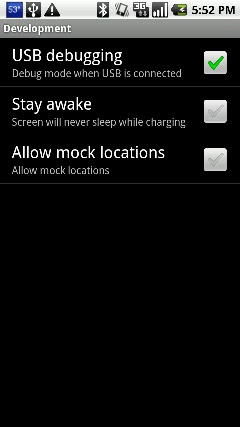
Phone Settings – Another troubleshooting step is to make sure the phone is setup for the USB connection. To do this all you have to do (on the phone) is:
Settings -> Applications -> Development -> USB Debugging (Make sure it is checked)  That’s it!

Once you have it installed there are a few cool things you can do with it. Let’s say you want to make a backup of all the apps on your phone.  All you have to do is key in this command:

adb pull /data/app ./

This will backup all the .APK files so you can reinstall them at a later time.  So now lets show you how to do the restore.  Put your APK files all into a single folder (c:apps), navigate to that folder and type in this command:

adb install *.apk

How about changing your boot logo?  Easy as can be…  Find a boot animation on the web that you want to use, and make sure it is a .ZIP file (that you have no need to open or modify, because it probably won’t work if you do) and rename it bootanimation.zip.  Copy the bootanimation.zip file to your “Tools” folder inside your Android SDK installation.  Finally type the following 2 commands to copy it to the phone:

adb shell mount -o rw,remount /dev/block/mtdblock3 /system
adb push pirate_bootanimation.zip /system/media/bootanimation.zipck/mtdblock3 /system
adb reboot

 Watch the phone screen and you should see the new boot logo!

So this is a brief look at what ADB does, and how to get it.  For more information check out the official Android ADB site and learn all you can on it.  Also remember to backup before messing around too much.  We are not responsible for data loss!


Some “Best of the Best” accessories for your Android phone:

Keyboard Options

Typing on an all touch keyboard can be a chore to learn, especially if you have a phone that is all touch. Every manufacturer has their own keyboard they use so it can even be confusing if you upgrade phones.  Most phones also have the stock android keyboard installed, so if you decide to try that you can easily switch to it and try it out. But how?
To switch keyboards all you have to do is go into an app that has a spot to type, for example I will use the “Messaging” app. Simply press and hold on the area where you would be typing and look for a popup that says “input method”. When you choose that it will give you a list of installed keyboards.

So what if it doesn’t show any keyboard installed? First double check in your settings menu under “language and keyboard” and see what is listed there. If there isn’t a check mark next to an option, it won’t show up in the “input method” list.

So now you are probably asking yourself, “Where can I try out more keyboards?”. And the answer to that lies in the rest of this post.  Here are a few keyboard apps to try out and see what you think.  (Plus a bonus Amazon Appstore free keyboard of the day for 7/21/11.)

Name: SwiftKey X
Description:
SwiftKey X is a next-generation AI keyboard, now with unrivaled prediction and personalization.

SwiftKey X for smartphones builds on TouchType’s SwiftKey keyboard to offer cloud personalization, a new prediction engine, and a host of new UI improvements.

Using artificial intelligence breakthroughs, the SwiftKey X keyboard accurately predicts your most likely next word based on what you’ve already written. It can also scan your sent messages, and learn as you use it to make predictions even more accurately over time. The more you get to know your SwiftKey keyboard, the more it will get to know you.

Download Link: http://goo.gl/VwvNj (Amazon)

Name: Keyboard from Android 2.3
Description:
If your phone isn’t updated to gingerbread yet you can get the keyboard from 2.3 and load it right on your phone.
Features:
1. Multitouch keyboard
2. User dictionary, built-in dictionary
3. Auto correction
4. Redesigned and optimized keyboard layout and style
5. Speech to text
6. Split main keyboard app and dictionaries.
Download Link: http://goo.gl/ms99g

Name: Better keyboard 8
Description:
Better keyboard is the best and the most popular keyboard on the android market
Supports many languages:
Arabic, Czech, Danish, Deutsch, English, Espanol, Finnish, French, Hungarian, Hebrew, Italiano, Korean, Netherlands, Norwegian, Norwegian (Bokmål), Polish, Portuguese, Russian, Slovenian, Swedish
Download Link: http://goo.gl/gbEBT

Name: Perfect keyboard
Description:
Take command of your Android device’s touchpad keypad with a Perfect and smart Keyboard for android. You can customize the look of the keyboard with eight different themes and add additional functionality to your device. Perfect Keyboard lets you use custom dictionaries, control background and text colors, and adjust the keyboard’s vibration density. In short, Perfect Keyboard allows you to setup your Android phone or tablet’s touchpad keyboard so that it works best for you.
Note: Perfect Keyboard works only on Android 2.2 and up
Download Link: http://goo.gl/W9BSX

Name: Swype Beta
Description:
-Swype v3 introduces two major new features: Tap Correction and Horizontal Word Choice List
-Our Tap Correction engine utilizes many of the concepts that make swyping so accurate. Seamlessly go from typing to swyping and back without missing a beat!
-The Horizontal Word Choice List replaces our popup word choice window, giving users an experience more in-line with evolving Android standards. It also makes dictionary control and word selection faster and easier.
-Swype v3 is available for devices with HVGA, WVGA, FWVGA, QVGA, WQVGA, WSVGA, qHD screen sizes
-Introducing a special Honeycomb-only WXGA version for Android tablets, with features like “moveable keyboard” that you won’t find anywhere else!
-To see which languages are supported on your device, check the language and resolution table
-Improved licensing: Swype will no longer be disabled after a reboot on some devices; added support for devices that don’t have a cellular radio (wifi-only tablets); no more license failures for CDMA devices in airplane mode.
-Simplified registration by allowing users to authenticate their email address directly through the installer
-Too many other improvements to list! Download Swype v3 NOW to explore everything the next generation of Swype has to offer!
-Limited End User Support – mostly via our forum
-If your phone came pre-installed with Swype
-DO NOT download this beta (it won’t work)
Download Link: http://goo.gl/1yfdg

Some “Best of the Best” accessories for your Android phone:

Deluxe Ultra Voice Changer – Free Amazon Appstore App for 7/20/11

Haven’t you ever wanted to be able to change your voice to make it sound like a robot, alien, chipmunk, robot, or simply add echo, or make it sound all metallic. Plus did I mention you can make it sound like a robot? As a robot I have all these sounds built it, but for you humans all you have to do is download today’s Amazon free app of the day. If you grab this download today you get it for free, saving yourself a whole american dollar.

Name: Deluxe Ultra Voice Changer
Description:
Tired of the sound of your own voice? Find a new one with Deluxe Ultra Voice Changer, a fun vocal-effects app for your Android device. Enjoy 23 different voice effects in this deluxe version.

Hear yourself talk like an alien, robot, or chipmunk; play your voice backwards, sped up, slowed down, with an echo, or by using other effects. Crack yourself up or weird out your friends and family–it’s easy and fun.

23 Voices, Endless Fun

Creating crazy new voices is simple with Deluxe Ultra Voice Changer. The recording process is user friendly, and a detailed Help page answers any questions you may have as you explore all the app’s options. (For example, if you hear excessive static during playback, a helpful tip suggests that you lower your recording volume and try again.)

Keep in mind that a one-minute audio file created by this app will be about 1.3 megabytes in size. Unless you’re on an unlimited data plan with your carrier, you may want to minimize sending audio recordings via e-mail when using this app.

Download Link: http://goo.gl/KUAyq

Some “Best of the Best” accessories for your Android phone:

JogTracker Pro – Free Amazon Appstore App of the Day

I am actually excite to try this app out.  I want to do a comparison verses the Nike+ watch and chip in the shoe thing.  I know that the Nike+ thing isn’t very accurate compared to the treadmill, or actually on a path that has the distance marked.

I will do the comparison test and keep you all posted.

Name: JogTracker Pro
Description:
Keep track of your distance in miles or kilometers. Use GPS and Google Maps to help you find your way. View your jog history on the Web. Share your progress on Facebook and Twitter. Listen for voice prompts at intervals.
Download Link: http://goo.gl/vMQxU

Some “Best of the Best” accessories for your Android phone:

New Android Market

I stumbled across a way to update your Android Market to the new version.  (See awesome screenshot below)

Name: Updated Android Market
Description:
To get the update all you have to do is download the correct .APK file. I have linked to it below,or through the QR code to the left. The file is hosted through Mediafire. I have heard reports of it working with both rooted and nonrooted phones. Simply download and install the APK file and when you open the Android market it will look like the new menu.
You will now see that it is broken down a little more and has the “Books” and “Movies” categories. This has been a common complaint as I have searched by keyword and had all of the ebooks lumped in with all the games, so hopefully this will correct things. So load it up and see what you think if you don’t want to wait for the update to come into your phone on it’s own…
Download Link: http://goo.gl/wctRe

Some “Best of the Best” accessories for your Android phone:

Sinister Planet – Free Amazon Appstore App of the Day 7/16/11

Name: Sinister Planet
Description:
You have worlds to conquer
Blast your way through wave after wave of relentless alien hordes and destroy increasingly challenging planets in this action-filled app for Android. Beautifully rendered meteors and retro-style graphics transport you back to the heyday of arcade classics in Sinister Planet.

Mission Objective
Your objective is to attack and destroy a series of alien worlds, progressing toward the ultimate challenge: Planet Sinister. To destroy each world you have to attack the surface and take out the power grid protecting the planet’s core. To aid you in your quest, you have the opportunity to upgrade your ship’s weapon systems by collecting power-ups (in Arcade mode) or amassing gold (in Battle mode).

As you progress through the waves, you will find yourself needing those upgrades as more deadly enemies are introduced. Upgrades available include extra laser pods to double or triple your firepower, ECM attacks (aka Smart Bombs), turrets for 360-degree shooting, and more.

Make little ones out of big ones
Collect the Gems
To make it through each wave, collect the gems produced as you blast the asteroids out of the sky. Don’t worry, the asteroids won’t hurt you, but you will face a different challenge–your enemy just loves to grab those gems too. Make sure you reach them first, and shoot them quickly, or they will be transformed into much more dangerous foes.

As a welcome respite from the hard-core destruction, you get the chance to gain bonus points by completing the challenge waves. Aliens will fly in formation around your ship while you attempt to execute a complete wipe-out. It’s not easy, but getting the right upgrades will greatly aid your mission. During the challenges your ship gains temporary indestructibility.

Download Link: http://goo.gl/5fS2R

  Some “Best of the Best” accessories for your Android phone: