Dashboard Assist PRO: In-Car Dashboard, Hands-Free Answering, and Journey Logger – Free Amazon Appstore App of the Day

Name: Dashboard Assist PRO: In-Car Dashboard, Hands-Free Answering, and Journey Logger
Description:
Share the details of your trip with the pre-prepared memo template
This app isn’t just a dashboard assist, it’s a comprehensive co-pilot, chock-full of savvy features and logging capabilities. Use it to record (and improve) your carbon footprint, to refine your driving technique, or just as a journal, to log the minutiae of long trips. This app tracks your speed, time, mileage, and direction. It provides a comprehensive dashboard, and can also run in the background of other apps. Access the active app by tapping the icon in the notification bar of the phone. Pause the app between legs of a journey to conserve battery and halt the tracked time.

Oodles of Features
Dashboard Assist Pro acts as a speedometer, compass, and odometer with a variety of customizable style options. Track your speed visually or have it spoken to you. This PRO app has live graphing features for tracking your speed in real time. Graph your speed by recent or whole journey timeframes. The Eco light tracks your carbon footprint by analyzing your average speed, acceleration, and cornering. Flick the main screen to the left to see these averages in action, as well as all three eco views. Flick once more to see the double dials of the current time and speed (always use your automobile’s speedometer as the true reading).

Taking Hands-Free to the Next Level
Tap the settings button to confirm the automatic setting options. This application can be set to only answer calls from contacts and to automatically answer calls by putting them on speakerphone (after announcing who is calling first). Opt for the auto-text feature, and after the sending party is identified, the contents of your text can be read to you for a totally hands-free driving experience.

Customize your auto answer options
Dashboard Assist Pro also hosts an in-app music player. Play music or recorded books while you drive. The music shuttle controls appear in a slide-out panel on the main dashboard, easily accessible without journeying out of the application. A sharing option makes this app convenient for recording and sending mileage details and driving statistics while on business trips, or for personal use. The fourth screen contains both of these sharing options and keeps a prepared memo of your travel data for both corporate and performance-based messages.

There is a free version of Dashboard Assist that is ad-supported. It does not support the auto-answer or auto-announce features, nor the speed graphs or chronometer.

Download Link: http://goo.gl/EJa8I

Some “Best of the Best” accessories for your Android phone:

Amazon Appstore Free App of the Day – Paper Glider (7/10/11)

Although the ratings weren’t all that great I did give it a try this morning.  It is really just a game where you glide a paper plane past various backgrounds.  It does have some cool power ups and the graphics are nice, but I got bored of it after a few minutes.  Definitely worth a try for the low low cost of FREE – But remember, it is only free today  7/10/11.
From Amazon:

Some “Best of the Best” accessories for your Android phone:

Age of Zombies – FREE Amazon App of the Day 7/8/11

Today’s free app of the day from Amazon is a great one.  Age of Zombies is a zombie shooter where you are thrown back in time to fight zombies.  Not just regular human type zombies, but caveman zombies and dinosaur zombies.  Because contrary to popular belief cavemen and dinosaurs did coexist (completely made up lie).

Here’s the official trailer for the game from our friends at Halfbrick:

To download the app for free (today only 7/8/11)  go here and install Amazon App Store, or follow the QR links below:

Some “Best of the Best” accessories for your Android phone:

Wireless Tethering – “Why Root?” Part 1

As discussed in the article “Root – The "What?” “Why?” “How?” Article", the first mentioned reason why you would want to root your phone is to be able to share the phone’s internet plan with your computer(s).  Computers love internet access. They almost need it anymore, with the increased popularity of apps like Google Docs, and other web based software.  Plus you humans with your addictions to things like Facebook you need the internet access as much as the computers do…

So you have a couple of options.  Pay your carrier an additional fee to use the same internet plan on another device, or take matters into your own hands and unlock the phones capability to do it on it’s own.  This process is called rooting and is discussed briefly in the above mentioned article “Root – The "What?” “Why?” “How?” Article".  Remember the disclaimer portion too, that the process is a software modification that can cause damage to your phone if you don’t know what you are doing.  You can’t blame me if you mess up your phone doing this.

As you can see from the program screenshots, the main program is pretty simple. The far left image shows that the  app loads up to a screen where all you have to do is press on the center icon and it will create and stop a WiFi network right from your phone.  The 2nd and 3rd screens are images of the settings available to the program where you can set up passwords and adjust things like the channel. The final partial screenshot is an example of what the widget looks like, so if you just want to start and stop the network, you just have to click the widget – kinda like turning te built in switches on and off.

A couple of disclaimers:  Speeds will very based on your carrier’s network. I have seen as high as 12MB on 4G, or 2 or 2MN on 3G. Also, this might not be available in the market through your carrier. Carriers have been blocking this app left and right.  Obviously because if you are using this app they aren’t getting their money from you for the “extra” service. Depending on your carrier, you may also get a message asking you to stop.

So check out their website and if you have any questions, post them in the comments.

Download links:

Android Market Link:
https://market.android.com/details?id=android.tether

Remember: If this doesn’t work try the below link for the Google Code site to download it directly.

Google Code Website Link:
http://code.google.com/p/android-wifi-tether/

Remember: To install the downloaded .APK file follow the directions at: http://www.oldandroid.co.cc/2011/07/installing-non-market-apps.html

In Use Photo:

Some “Best of the Best” accessories for your Android phone:

Installing Non-Market Apps

So you found a cool app you want to try out, but when you click on the download link it doesn’t take you to the familiar grounds of the Android Market.  A great example of this is the Amazon App Store application.  It makes sense that you wouldn’t find a link to this great application on the Android Market, because it is a direct competitor.  Another great example is the large number of apps that are available on http://code.google.com.

The first thing you are going to need to know is that out-of-the-box the Android system won’t let you install anything non-market.  BUT, there is an incredibly easy workaround to this problem. All you have to do is select the little “Settings” icon from your main menu, and choose the “Applications” menu.  Once you are there you will see a little icon that looks like the below image.  Along with a little checkbox labeled “Unknown Sources”.  This would be that quick fix. 
Just check the box and you are all set.  
Next, simply load up your browser to one of the above mentioned sites and click download.  You will notice that the file being downloaded ends in .APK.  This is the standard format for an android application.  If you find that it is a zip your best bet is to hook up to a computer and unzip the file.  You can also do this with a few different programs, right on your phone. Just fire up Android Market and search for unzip.  If you decide to go that route you will also want to look into a File Manager app, so you can view your memory card – especially the “Downloads” folder.
This is a great trick that doesn’t force you into hacking/rooting your phone at all, and a relatively safe trick too.  Post up a comment if you have any questions.

Amazon Free App of the Day – Convertr

Convertr – Normally $.99, today FREE.
From Amazon.com:
Convertr

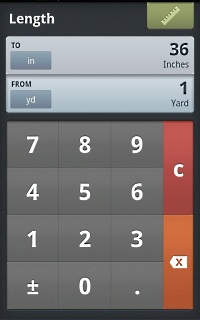
Length: inches to yards
Convertr

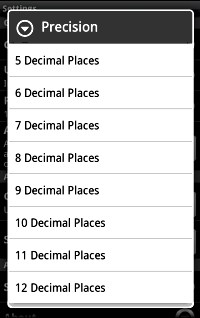
Adjust result precision
Convertr

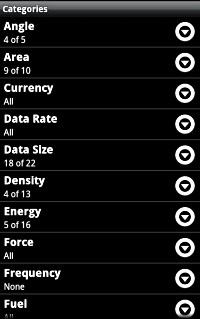
Configure unit categories
The Only Unit Converter You’ll Ever Need
If it’s convertable, Convertr can calculate it, instantly and accurately.
From angles, to energy, to mass, to torque, and many more, find exact conversion of units in precision that you can set to 12 decimal places.
A Wide Range of Conversion Units
For example, in the Angle category, you can convert units of degree, radian, grad, mil, and revolution from one to another. For Area, you can convert units of square inch, square foot, square yard, square mile, square millimeter, square centimeter, square meter, square kilometer, acre, and hectare from one to another. Length has 26 conversion units, Mass has 16, Volume has 48, etc.
Convert Units in These Categories:
  • Angle
  • Area
  • Currency
  • Data Rate
  • Data Size
  • Density
  • Energy
  • Force
  • Frequency (disabled by default)
  • Fuel
  • Length
  • Mass and Weight
  • Power
  • Pressure
  • Speed
  • Temperature
  • Time
  • Torque
  • Typography
  • Volume
Elegant Function with No Clutter
Convertr is designed for fast, efficient, and visual unit conversion on your smartphone. Its uncluttered layout won’t get in the way when you want to make conversions quickly.
Currency Converter Par Excellence
Do you need to make multiple currency conversions? Perhaps as many as 61 different currencies? No problem for Convertr.
With the Currency Updates feature, you won’t have to wonder if today’s rates are different than those the app is using. With data connection, Convertr automatically keeps its currency values up to date.
Favorites
Do you like the idea of having so many categories of units available, but can’t imagine yourself scrolling endlessly through the categories list for units you use often? You can mark categories of units you use a lot as favorites. Then, whenever you want to make a quick calculation, just tap the Favorites button and only those categories you’ve marked come up in the list. Did we mention uncluttered and quick?
Rate and Follow
This app is well supported by Vervv, the developer, and you are welcome to follow its progress on Twitter. You can also rate the app on the Amazon Appstore using a handy link in the app.