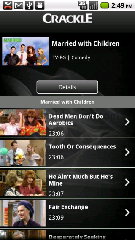
Free Movies and TV (Without a Subscription) via Crackle

If you have seen the Netflix app and been a bit jealous of it, but still couldn’t bring yourself to pay the $8 a month for the service than Crackle is for you.

Crackle is an app that gives you access to a bunch of movies and TV shows right on your Android phone.  Movies like Pineapple Express, Big Daddy, So I Married an Axe Murder, and TV shows like Seinfeld, and Married With Children. 

All for free. A free app and a free service, so download it and enjoy!

Check out “Crackle – Movies & TV”

Beautiful Widgets (For Free)

I just noticed that on the GetJar.com site they are offering one of the best selling Android apps of all time for FREE.  Beautiful Widgets is a widget collection that provides a fully customizable clock with weather along with a large list of toggle widgets that you can use to turn on and off things like wifi, 4g, brightness adjustments, etc.

From the Developer:
– Super Clock widget with weather, battery or just the clock 4×3 4×2 4×1 2×1
– Weather only widget 4×1 1×1
– Battery widget 1×1
– Date widget 2×1 1×1
– Text Clock simple widget 2×1
– Toggles widgets 1×1
– Home widgets with clock and weather and 300 skins 4×1 2×1

To download to your phone:

  1. 1) go to m.getjar.com on your phone
  2. 2) Select Quick Download at the bottom of the page
  3. 3) Enter 231883

FINALLY A .COM!

Just a quick not to say that Old Android officially has it’s own .com, and not the free .co.cc address that it used to have.  This means that it’s easier to type and easier to remember (plus it will play a lot nicer with Google).

Watch for updates to the Old Android App as the address where it gets it’s information from will be different. And it needs some work on it’s icons too…

Back To School – Student’s Edition

As mentioned in the last post it is that time of year for all the young ones to go back to school. To help them prepare for this change from the lazy days of summer I have put together a couple apps that students can use as you are going back to school.

So check out these apps, and remember to be safe out on the roads and watch out for walking kids and school buses!

Name: School Assistant

Description:
Everything a student needs to keep organized now fits in your pocket!
School Assistant is your Android school planner, keep your routine organized with it.
You won’t forget any tests or works, School Assistant reminds you and lets you see progress charts and statistics.
School Assistant can mute your phone and notify you when a class starts based on your schedule.

Name: myHomework

Description:
The best way to keep your school life organized
Official myHomework app for Android.
Teachers not letting you use your phone in class? Parents on you for missing assignments? Show them you’re organized with myHomework.
myHomework is focused on apps that make student life easier. Our iPhone version has over one million downloads and now we’re bringing that same experience to Android.

Name: Dictionary.com

Description:
Take Dictionary.com’s trusted reference content wherever you go.
The free Dictionary.com app delivers reference content from Dictionary.com and Thesaurus.com. The app also features audio pronunciation, voice-to-text search and Dictionary.com’s popular Word of the Day and Hot Word blog.

* Dictionary and Thesaurus
* 375,000 words and definitions
* 300,000 synonyms and antonyms
* Phonetic and audio pronunciation
* Spelling suggestions
* Example sentences
* Word origin and history
* Daily content, including Word of the Day and our new Hot Word blog
* Voice-to-text search (for the most accurate results, please enunciate clearly and speak slowly)
* Favorite words list
* Custom backgrounds
* Text and email definitions from the app
* Word of the Day home screen widget

Back To School – Parent’s Edition

Well it is that time of year for all the young ones to go back to school.  To help them prepare for this change from the lazy days of summer I have put together a couple apps that parents can use to help your kids cope with back to school.

So check out these apps, and remember to be safe out on the roads and watch out for walking kids and school buses!

Name: School A to Z
Description:
Do you struggle to understand your child’s homework? Does your child need to practice their spelling and times tables? Are you looking for inspiration for projects and assignments?

The School A to Z app is an essential tool for every parent of school-aged children. Produced by the NSW Department of Education and Communities, the School A to Z app brings together a wealth of resources to help parents to understand and support their child’s homework.

Name: My HomeworkNOW & School Alerts
Description:
Get school alerts and classroom homework with My HomeworkNOW & School Alerts.

Stay connected to your school or your child’s school and classes with the My HomeworkNOW & School Alerts mobile application.

With this homeworknow app you can: receive school alerts (such as closings, emergencies, back pack notices, announcements, etc.) with real time notifications, view the latest school wide notifications on-demand, view classroom information and homework on-demand, get notifications when teachers update a class page or homework assignment.

This app requires that you have a My.HomeworkNOW.com account and that your school or teachers use HomeworkNOW.com as its school to home communication solution. If your school doesn’t use HomeworkNOW.com to post classroom happenings, homework, and school alerts, talk to your school administrators and teachers. Let them know you want to receive your school information on your mobile device with HomeworkNOW.com!

Don’t have a My.HomeworkNOW.com account? Create one today with your web browser at http://my.homeworknow.com. Add your school and classes to your account, then choose all your communication preferences (text message, email, mobile apps, Facebook, RSS, etc.). IF YOUR SCHOOL DOES NOT USE HOMEWORKNOW, TELL THEM YOU WANT THEM TO! (http://my.homeworknow.com/tell.php).

About HomeworkNOW.com: Through a web browser, Facebook, email, Text Messages, Mobile Apps for iPhone and Android, RSS feeds, and more, HomeworkNOW.com makes it possible for schools to communicate to parents and students in any manner the parent or student choose. Used by teachers, administrators, and parent-teacher organizations of thousands of k-12 schools, HomeworkNOW is the most efficient means of keeping students & parents connected. Its web based. Ad free. No software or staff needed. Communicate without cost. Tell your school administrators about HomeworkNOW.com today!

Android… On Blackberry???

This is news for all the people out there that either have a Blackberry and love it, or are stuck with a Blackberry for work email. It looks like RIM has decided to include a “app player” in it’s upcoming versions of their Blackberry OS.

This is great news considering more and more developers are jumping to Android making the Market have hundreds of thousands of apps available, as opposed to the minimal number Blackberry has.

If you have a Blackberry Playbook there is a leaked version of the “App Player” of it floating around that you can load onto your current Playbook. Our friends at n4bb.com have more information on the leak.

From their site:

Wow, here is a serious surprise for PlayBook owners. Apparently, this was easily found through a changelog in a Desktop Manager update. We’ve been sent a beta build of the Android App Player for the PlayBook. It is a huge file, lags a bit, has no visible back button (you have to swipe left on the bottom bezel), but we’re told nonetheless it works. The app itself is controlled through a series of swipe gestures. This beta version is fairly old, so don’t hold it against them. You of course have to side-load the .bar file to install. Google search for DDPB installer to side-load easily.

Download PlayBook Android App Player from:
Mirror download links: