Gem Spinner – Free Amazon App of the Day 8/24/11

Name: Gem Spinner Description: Spin Those Gems, Round and Round In Gem Spinner, you swap, spin, and slide the gems until you match three in a row. Finagle these beautiful gems to earn points against the clock with each three-way match. Fun to play and aesthetically pleasant, Gem Spinner is a challenging game with an animated, colorful, and well-crafted interface. Please note that Gem Spinner is not optimized for tablets. Drop and Drag Matching Gem Spinner isn’t your ordinary match-three game. In this unique variation, the gems are arranged inside shapes of different sizes. As you clear away gems, the shapes drop into the cleared area, much like Tetris blocks. gem spinner Swap adjacent gems to match three in a row. Double tap a gem to spin its shape 180 degrees. Match all the gems in a piece to clear the piece from the board. Drag shapes to empty board spaces to create more match opportunities. Match enough gems to complete the level goal and then continue to swap, spin, and drag to try to clear the entire board. Practice Makes Perfect Gem Spinner has two game modes. In Practice Mode, hone your gem spinning skills with no time limits. You can practice on six different boards under no pressure. When you’re ready to start spinning for real, try to beat Level One (“The Boxer”) with a time limit. As you ascend through the levels, you get less time to finish the boards, and the goals get tougher. Master the Gems Gem Spinner features a narrated and animated tutorial, so you’ll quickly understand how the game works. Conquer 35 levels that get increasingly difficult. You can also play the boards at various levels of difficulty. Track your score, and compare your skills with others all over the world. Just don’t make yourself too dizzy spinning those gems!

ZDefense – Free Amazon Appstore App of the Day 8/22/11

Name: ZDefense
Description:
Pure Tower Defense
ZDefense distills the best elements of tower defense games. This game features sharply drawn, geometric shapes on a hexagon grid, recalling the timeless old-school designs of such arcade classics as Tempest and Breakout. This fast-paced game will challenge even the most experienced tower defense fans.

Tower Defense 101
For those unfamiliar with the addictive tower defense genre, the game mechanics are fairly simple. You’re provided with cash to build towers of varying designs, strengths, and costs. Eventually your enemies (called “creeps” in this game) will come pouring out and make a beeline toward the exit you’re defending.

Every time you blast a creep, you gain a little money to build more towers. You can also spend your money upgrading the towers you have. Every time a creep reaches the exit, you take damage. Tower defense games are essentially a juggling act of resource allocation and fast reflexes.

Stay Calm. Don’t Panic. Keep Firing!
As creeps keep coming and coming, ZDefense evolves into a frantic maelstrom of destruction. You’ll face 50 waves of enemies in less than five minutes. Defend an exit in the middle of the map from creeps coming in from all directions. You simply can’t use the same strategy for every level; you must change up your tactics for each map.

ZDefense’s maps generally have 10 to 30 waves of enemies. The full version features five tutorial, ten normal, and eight hard maps. There are five tower types with seven levels each. To make your life more complicated, a special tile called the Space Gate allows creeps to teleport from one gate to another.

Command the Creeps
ZDefense comes with a map editor so you can create your own nightmare scenarios to terrify your fellow tower defense fans. The editor comes with full instructions and customizable maps, creeps, towers, and waves. Customize the game mechanics, such as wave wait times, base life, money, and more. You can also take screen captures of your game to record your victories and show off to your friends.

Some “Best of the Best” accessories for your Android phone:

FRG Deluxe – Free Amazon Appstore App of the Day 8/20/11

Name: FRG Deluxe
Description: Fight off hordes of enemies with an armored robot in this arcade shooter for Android. Unlock different weapons and robot types as you fight your way through 18 challenging levels. Mow down lone enemies with the rapid-fire chaingun, then switch to the shotgun to clear out waves of foes.

Use your skills to stay alive as you complete achievements and challenge yourself across three difficulty levels. Climb your way to the top of the leaderboards with online high score listings!

In FRG Deluxe, players take control of a heavily armed robot on the battlefield fighting off hordes of different enemies. Move and dodge attacks using the touchpad or optical joystick, or touch and drag your robot across the screen to activate boost. Use the Menu button switches between your different unlocked weapons–lock on and fire one of six deadly weapon types to destroy your foes. Gain points by completing different achievements and improving your score, then use them to upgrade your robot with different weapons, armor, and power ratings.

Up to eight players can battle it out in a free-for-all deathmatch. Find online matches with other players in the online games list. Grab your favorite robot and start playing online. With three difficulty settings to choose from, anyone can find a suitable challenge for their skill level. Rack up the points, complete achievements, then compare scores with the rest of the world through OpenFeint’s online leaderboards.

Additional Features:
-Play through both normal mode and survival mode.
-Change three different settings for each robot: armor, speed, and power.
-Learn the basics of gameplay through in-game help documentation.

Some “Best of the Best” accessories for your Android phone:

Overkill – Free Amazon App of the Day 8/17/11

Name: Overkill

Description:

Fly your ship through asteroid fields and waves of enemies to collect, upgrade, and destroy in Overkill. A side-scrolling shooter full of pure adrenaline-pumping action, Overkill puts an AI-guided spacecraft with responsive tilt controls at your disposal to help you defeat thousands of foes, earn high scores, and share those scores via online leaderboards.

Objective
Fight through enemy forces and challenging bosses, destroying anything that gets in your way to earn points and money. Occasional secondary objectives help keep gameplay varied, while you use the money earned to return to your hangar and upgrade your three weapon categories (cannons, rockets, and heavy weapons) in order to eradicate enemies and debris more efficiently. You also collect power-ups like rapid fire and double damage for increased destructive power.

Gameplay Modes
Start a new game and get into the main campaign, which is narrated by your ship’s AI. Or jump into one of several quick missions and bonus missions reflecting the campaign’s objectives in stand-alone form. You can even play survival mode if you’re up for a high score challenge. In the campaign you can select from four different difficulty levels for a variety of experiences: easy, normal, hard, and extreme.

Score Submission
At the end of each level, submit your score to the Scoreloop leaderboards with a Scoreloop login or a unique player ID. This widely used system lets you find out your rank for the last 24 hours, among players worldwide, or among your friends.

Additional Features
-Autosave when backing out of the game or exiting to your home screen
-Set controls to use the accelerometer or the touchscreen and keypad, trackball, or directional pad
-Tweak control sensitivity, sound effects, and music
-Increase the graphical filtering and detail if your phone has more powerful hardware
-Expect new levels, weapons, and power-ups to be added in future updates

Some “Best of the Best” accessories for your Android phone:

Help With Email Setup

So you have your gmail all setup on your Android phone, but you probably have (at least) another email address you would like to have setup.  I mean as amazing as Gmail is, people out there still use other email services.

Some email accounts are incredibly simple to setup.  AOL for example.  They use IMAP, and Android knows it, and just sets it up for you.  On the other hand, there are a few that I am going to give you some tips on how to make the most of your non-gmail email.

The first is Hotmail (or MSN).  Don’t get me wrong. If you key in your email address and password it will take it and give you pop3 access to your email.  The problem here is that pop3 is incredibly limited compared to either IMAP, or the ultimate Exchange server.  With pop3 you have the ability to pull emails from the webserver, and either delete them, or leave them as unread. Well it is great that you can get your email, the downside here is that you will either not get your emails on your home computer, or if you do you will probably have to delete your discarded email in both places.

So you can see how inconvenient this would be.  Wouldn’t it be nice if there was a way to set this up more like a gmail account and have the email automatically pushed to you with full sync capabilities?  Plus while they are at it throw in calendar support and contact sync too?  Well the good news is that the fine people at Microsoft (probably will get some slack for that one) have given Hotmail users access to their email through an exchange server, which is what a lot of companies use to get business grade email to their employees.

Using the following directions will allow you to setup your email as an exchange server:

Email: myemail@hotmail.com (or live.com)Server address: m.hotmail.comSSL enabledUsername: myemail@hotmail.com (or live.com)
Password: passwordDomain:

There you have it.  Email Calendar Contacts, all loaded into your phone!

Next, for all you Yahoo users that are having issues… When setting up your Yahoo email with the default settings you will probably see a disclaimer that only certain accounts have the ability to access their email on a mobile device, and that you may have to subscribe to their plus service to get the access. This is where the biggest workaround comes into play.

The first step is to skip the normal email setup.  Yahoo has taken their email a step further and provided the user with a free standalone app for Yahoo email.  It is available through the normal app channels, along with their website: http://mobile.yahoo.com/mail/android,  Simply download it, install it, login with your Yahoo ID and you are good to go!

The last email that I will cover is for those of you stuck using Comcast. Comcast email is always a chore to get working through the mail icon and you will get limited help from their tech support.  But lucky for you, Comcast has followed Yahoo with the whole app thing.  All you have to do is download the app, install it and login with your email address and password – then you are all set!  Link:

So load up your emails. I mean you can’t ever have too many.  I have a dozen or so…

Some “Best of the Best” accessories for your Android phone:

Trip Journal – Amazon Free App of the Day 8/16/11

Name:Trip Journal

Description:

A Multimedia Travelogue
Trip Journal enables you to capture your vacation and travel experiences and share them with your friends and family in real time. Use the application’s built-in GPS and compass to track your route, progress, location, even altitude. Take your travel photos and videos from your mobile using Trip Journal, and record them with your travel notes as you go. Share your travel experiences day-by-day and your completed travelogue using Trip Journal’s built-in links to Facebook, Google Earth, Trip Journal, Picasa, Flickr, Youtube, and Twitter.

Your Navigator and Record-Keeper
Trip Journal functions as your navigator and record keeper, always there to keep you oriented and on course, and to document your progress. You can check you current position at any time by tapping the “Locate on map” icon; both map and satellite views are available. Tap the compass icon not only to confirm the direction you’re moving in, but to see how your trip is progressing. Look at the top of the screen to find the distance you’ve traveled and the time that’s elapsed since the start of your trip, your average speed over the course of the journey, and the minimum and maximum altitudes you’ve reached.

Capture Your Experiences
Record your experiences as you go, through photos, video, and notes. To snap up important moments while they’re happening, choose “Capture media,” and start recording stills and video. These are automatically saved to your trip album. Record thoughts and impressions about your experiences as journal notes on the vintage notepaper template under “Write a note.” Whenever you review or share your trip album, these notes, images, and videos will be included.

Bring Your Readers Along with You
Trip Journal also makes it easy to share your travel experiences. The app includes built-in links to Facebook, Google Earth, Trip Journal, Picasa, Flickr, Youtube, and Twitter that you can use to instantly upload your routes, photos, video, notes, and more. Embed your trip in your blog to bring all of your followers along on your journey. And, when you’ve completed your trip, you have a complete, ready-made Trip Journal album to keep and share, preserving the whole adventure.

• Compiles ready-made, multimedia journal album as you go
• Supports blog updates and embedding
• Supports Android’s Froyo mobile platform.

Some “Best of the Best” accessories for your Android phone:

Everlands – Free Amazon Android App for 8/15/11

Name: Everlands

Description:
Story-Based, Hexagon-Shaped, Strategy Puzzle
Dark and sinister forces have invaded the colorful world of Everlands. Everlands animals must unite to combine the best of their abilities, together standing against the great threat that casts a shadow over their beloved homeland.

Each animal has unique strengths, weaknesses, and features. Defeat the foes of Everlands through strategy and tactics by combining dozens of animal abilities, leading them through more than 20 carefully prepared levels. Reveal the truth behind the source of mysterious evil in a unique turn-based game.

Game Objective
The goal of the game is to win battles by capturing as many enemy hexagons as possible with the strengths and abilities of your animal hexagons. If you manage to gain more than half of the combatants in that round, you win the battle.

Animal Hex health and attack power levels
Strategic Gameplay
Click on each animal hexagon to see useful information about that animal’s abilities. Based on that description, you place that hexagon on the board to prepare for battle against the enemy. Keep in mind the number and direction of the attack sides of each hex. The sides of your animal’s hex that have no attack direction are undefended. Those are the sides the enemy will try to attack. Ideal placement allows your animal to point its attack in the enemy’s direction, while leaving its undefended sides away from the battle’s front.

Social Networking Features
Invite, challenge and compete with your Facebook friends
Share your achievements on your Facebook wall
Facebook single sign-on support

Some “Best of the Best” accessories for your Android phone:

Free Apps for 8/14/11 (Amazon and GetJar.com) Memory Booster/TuneIn Radio Pro

So today’s Free apps are going to get posted together, mainly because the (Amazon) one isn’t worth a post of it’s own. From Amazon we have Memory Booster Ad-Free, and from GetJar.com we have TuneIn Radio Pro.

First up (Remember to read THIS article about task killers):

Name: Memory Booster Ad-Free

Description:
Memory Booster is a powerful mobile memory and RAM boosting tool specially designed for Android smartphone users. The app increases your phone’s performance by making more memory available for both your applications and your phone’s mobile operating system.

How it Works
Memory Booster helps your phone run at optimum efficiency by defragmenting your phone’s memory, recovering memory leaks from less efficient applications, and flushing unused libraries, among other nifty memory saving tricks. Your favorite games and applications will run faster and more efficiently with Memory Booster running in the background.

Features
Memory Booster provides a live chart to demonstrate your device’s total and free memory, and current memory usage. With Auto Boost Threshold set, Memory Booster keeps your memory higher than the desired level, and acts immediately if memory drops down. Besides automatic memory boosting, Memory Booster also allows you to manually boost your memory by Quick Boost. Other features include embedded Task Killer, Whitelist Manager, Boost Level Manager and Memory Boost Log, which assist Memory Booster to perform more efficiently and friendly.

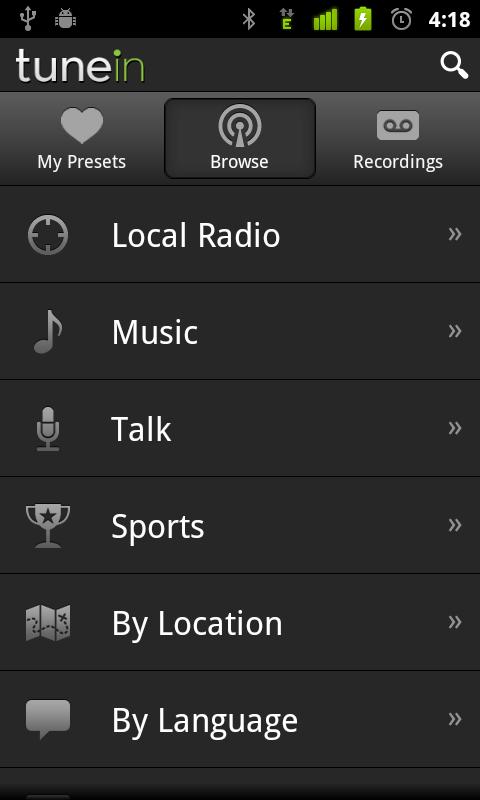
Next we have an incredible radio app. Possibly the best out there for internet radio.

Name: TuneIn Radio Pro

Description:
Radio live, local, and beyond.

Enjoy the largest selection of radio in the world, now with more than 50000 stations streaming live. You’ll find hundreds of music formats, talk personalities, national networks like BBC, NPR and SWR, podcasts, live sports, news, weather, even scanners.

Some “Best of the Best” accessories for your Android phone: