Supermarket Scramble – Free Amazon Appstore App for 7/27/11

Name: Supermarket Scramble
Description:
If you’ve always dreamed of owning your own business, here’s your (virtual) chance. There’s a catch, however. Your business is a grocery store, and the customers are quite demanding! In Supermarket Scramble, you’ll have to be quick on your feet–I mean, on your fingers–to succeed.

Miles of Aisles
Feeding the masses is a tough job, but you take great pride in your store and its customer service. In this game, you’ll be quite busy fulfilling shoppers’ grocery lists by lining up at least three in a row of that item on the “product grid.” It’s the classic match-three puzzle game, only with tasty food.

Say Shopper One has apples, lettuce, carrots, and sandwiches on her list. As quickly as you can, find places on the grid where you can slide these objects around (swapping adjacent items) to make three in a row horizontally or vertically. Once you’ve found enough of the desired food, that item is checked off the list. When a customer’s list is completed, you tap on the cash register to make the sale.

The Customer Is Always Right
Sometimes you get the Little Old Lady, who waits semi-patiently while you track down her oranges and bananas. Other times, you get the Diva. She’s late for a cocktail party and needs you to round up her items pronto, do you understand? It’s not easy to make her happy, but if you do there’s a big tip in it for you. And there are plenty of other customers–some of whom you need to unlock–with their own unique quirks.

Be sure to watch the patience meters that appear at the bottom of your customers’ lists, which reflect how fast you are filling their order. The faster you complete their order, the more bonus money you can earn. If the meter runs out, however, they leave in a huff and you just lost a sale.

Download Link: http://goo.gl/moGlZ (Amazon.com)

Some “Best of the Best” accessories for your Android phone:

GRave Defense HD – Amazon Appstore Free App for 7/26/11

Name: GRave Defense HD

Description:
GRave Defense HD is the next step in the evolution of tower defense games. Follow the harrowing encounters of the Fellowship of Survivals as you battle mutated zombies and formidable boss monsters.

Guess Who’s Coming to Dinner
In a post-apocalyptic world destroyed by a nuclear war, hordes of zombies hunger for human flesh. But these aren’t your garden variety zombies. It takes hundreds of rounds of high-caliber bullets to knock down these walking undead. It’s enough to make George Romero break out in a cold sweat. Fortunately, you’re packing some serious heat. Obliterate mutant hordes across 20 levels using fire, electricity, lasers, and other things that go boom.

But the situation soon gets from bad to worse. Zombies aren’t the only threats you’ll encounter. Some creatures are flyers that can only be shot down by certain towers. You’ll eventually face off against some of history’s most notorious villains, including Dracula and Frankenstein’s monster.

So Many Zombies, So Little Time
Each battlefield is unique. Visit exotic locations such as the Amazon Rainforest, the Bermuda Triangle, and even a space station that makes the Alien movies look like a Sunday picnic. You must use your array of towers and evolving tactics to survive. As you knock down each creature, you earn money to buy more towers. GRrave Defense is essentially a terrifying balancing act of resource allocation and military necessity.

View animated briefings
GRave Defense Gold on Steroids
GRave Defense HD includes all the levels from the original GRave Defense Gold, plus a new larger, beautiful (beautiful to zombies, anyway) multi-screen level. All levels, towers, mutants, special effects, and achievements are rendered in high-res graphics. Unlock new achievements, enemies, and towers. Earn new military ranks and climb up to the top of the hierarchy.

New Features
Challenge yourself with the new survival mode and four different levels of difficulty. GRave Defense HD also features visible monster paths, tower states and cool-downs, and a display for showing how much money each monster generates. Are you ready to be humanity’s last chance for survival?

Reviews
“If you’re a fan of tower defense games and/or zombies and have a nice device to play this on, get it. Hands-down, Grave Defense HD is one of the best tower defense games on Android.” – Droid Gamers

“…for serious fans of the genre who relish a mighty challenge GRave Defense HD is a title worthy of your strategic prowess.” – Pocket Gamer

Download Link: http://goo.gl/L6EtQ (Amazon.com)

Some “Best of the Best” accessories for your Android phone:

Lingrove – Word Game – Amazon Free App of the Day 7/25/11

Name: Lingrove

Description:
“Dark clouds were lingering in the sky, waiting to open up and drench the natives of Lingrove. I was sitting on the branch of my tree house and tying a swing to it. Suddenly a fierce thunder erupted in the sky, making me jump. I fell off the branch, crying "ouch!” as I landed with a thud. I started calling names looking at the sky. An even stronger thunder yelled back at me, the rain falling harder.

“That’s when I heard someone laughing. I looked around and saw a girl holding a basket of flowers. She was dressed in white and had the prettiest eyes. She just stood there, drenched in the rain, smiling and full of innocence.”

And so begins the love story at the heart of Lingrove, a challenging new word game for Android. Can you work your way through the puzzles and unlock the rest of the tale?

Word Workout
The word games in Lingrove are simple to play but difficult to beat. If you’ve ever played the colored-peg game Mastermind then you already understand the concept: Try to solve the mystery word by guessing different letters until you’ve found the right combination. Every time you put the correct letter in the right place in the word, the game draws a box around it. If you guess the right letter right but place it out of order, the letter is be circled. Then you just have to try it in another slot on your next guess.

In the picture at left, for example, the game helps you get started by providing the letter “C” in the correct location. The first guessed word (“WATCH”) does not reveal any other correct letters but it does eliminate W, A, T, and H from consideration. The second guess shows that P and E are also correct and in the proper place. It also reveals that there is an I in the word, but in a different spot. Third time’s the charm, as the answer is “PRICE.”

Note: Lingrove is compatible only with HDPI screen resolutions of WVGA800 (480×800) and WVGA854 (480×854).

Download Link: http://goo.gl/apsWJ

Some “Best of the Best” accessories for your Android phone:

Custom Rom – “Why Root?” Part 4

For this part of the conversation about Root we will talk about Custom Roms.

All of the internets are a buzz talking about Custom Roms. You may be asking yourself, “What is a Custom Rom?”  Well (put simply) it is an alternate build of the operating system for your android device.  So let’s describe it this way. Android is an Open Source operating system.  This means that the source code is all accessible to the common man.  So someone (or a group.corporation) can take the source code and make various changes/improvements.  So once installed it could have a different look, removed bloatware, added apps and features.

A couple of great examples of high quality custom roms are Cyanogenmod and MIUI. Both of these are available for a long list of devices and give you some very cool (and very different from each other) features. Cyanogenmod gives you a more Android stock look, preloaded with ADW Launcher and a bunch of preloaded features like tethering and different settings. On the other hand, with MIUI you get a totally redesigned launcher and menu system.  The software doesn’t have a menu tray, it preloads all of your apps into the expandable number of screens. You can sort them however you want, and add widgets too.
Check out these youtube videos.The MIUI videos are all in Japanese, but the software is available in English.


There are a couple ways to install either of these 2 custom roms to your phone, but today I will be covering the easy way, because if there is an easy way to do something why would you do it the hard way? So what is this easy way, you might be asking?  Well it is through an app called Rom Manager.

Rom Manager is a pretty simple looking app that gives you a few cool options. First off, to make it work you have to choose the first option at the top of the app, “Flash ClockworkMod  Recovery”.  What this does is overwrites the phones boot menu.  The manufacturer puts together a bootloader menu to give a few simple options if the phone’s software gets corrupt.  This overwrites it with a different menu that just adds a few options there.  This allows the phone to be easily flashed with non manufacturer software.

Once this is complete you can install a file downloaded from the developer’s website, or browse compatible roms right through the “Download ROM” menu.  Depending on what model phone you have it will give you a list of compatible roms, complete with screenshots, ratings and comments.

Once you choose the ROM it will download it and alert you when finished. Then it will give you the option to backup your current setup, and wipe your data (which I usually do).  Once you hitok it will reboot itself into the bootloader screen and do the options you have specified.  Then it will reboot into your new setup.  Try it out, see what you think, and if you don’t like what you see (provided you chose the Backup option) all you have to do is choose the “Manage and Restore Backups” option (Not shown in screenshots, scroll down on main menu to see it) and it will let you restore to your previous state.

So go out and try it!  Just make sure you are completely backup up before starting.  The cool thing about the recovery is that once flashed onto your phone (through the app) you have an extra step of protection on your phone for backups.  Also remember that we are not responsible for any damage or data loss.

Some “Best of the Best” accessories for your Android phone:

Silly Dino – Seymour Simon – Amazon Free App of the Day 7/24/11

Name: Silly Dino – Seymour Simon

Description:
Funnysaurus!
Bring a smile to your children’s faces with Silly Dino, a collection of witty dinosaur riddles for your Android phone or tablet. Featuring simple riddles as well as pleasing and clever illustrations, Silly Dino provides an amusing way to help your children read, learn a few riddles, and even memorize a little something about dinosaurs.

Written by noted children’s science author Seymour Simon, Silly Dino features an assortment of 10 dino-tastic riddles. Simon’s longtime collaborator Dennis Kendrick provides charming images to accompany each riddle and its answer. Simon, whom the New York Times called “the dean of children’s science writers,” is the author of more than 250 acclaimed science books introducing children to a variety of scientific topics and encouraging them to engage with the world around them.

Easy to Use
Silly Dino’s intuitive interface lets children cycle through the riddles by easily swiping their finger across the screen. For children too young to read or those just learning, Silly Dino includes an audio feature that reads the riddles aloud in a clear voice while each word is highlighted on the screen as its read.

Silly Dino also provides a short matching quiz where children can match a dinosaur illustration with its particular amusing description.

Sure to tickle young ones’ funny bones, Silly Dino asks and even answers the immortal question: Why did the T-Rex cross the road? (Because the chicken called in sick!)

Download Link: http://goo.gl/M8qIs

Some “Best of the Best” accessories for your Android phone:

Android Debug Bridge (ABD) Beginner’s Guide

ADB (Android Debug Bridge) is a fancy tool that Google has made available to Android users and developers. It is part of the Android SDK (Software Development Kit).  Basically it creates a connection (Bridge) between the Android and the computer. It was originally used as a tool to achieve root on the phone, and to be able to do some additional functions, similar to a linux command line.  A lot of the same commands can be done on the phone through a terminal emulator program (right on the phone), it is so much easier to be able to type it all on a full sized keyboard (plus it makes you feel more like a computer nerd).

Although all of this may seem a little complicated at first it is very simple to setup and use.  At the bare minimum you just have to download the software, install it (I usually install it to c:android), change a setting on your phone (See “Phone Settings” below) and plug the phone and computer into the USB cable. A very simple installer has been put together entitled ADB for Dummies by AndroidSamurai that provides an installer that puts all the files in the right places.  There is a simple command you can do to verify that everything is installed properly.  Open up a command prompt (Start -> Run -> CMD) and switch to the “Tools” folder (wherever you installed the above mentioned software) and type the following command:

adb devices

You should see a long string that will be the ID number of your phone.  You don’t need to memorize it, you just need to see it there to know that the computer properly sees the phone. If you don’t see it, it is most likely an issue with a driver.  Go to the manufacturers site, or simply search google for the manufacturer and the word driver.

Phone Settings – Another troubleshooting step is to make sure the phone is setup for the USB connection. To do this all you have to do (on the phone) is:
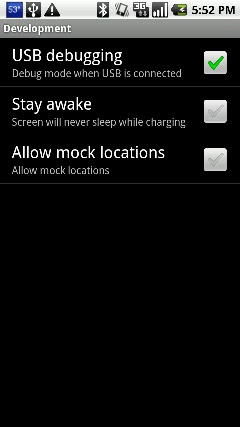
Settings -> Applications -> Development -> USB Debugging (Make sure it is checked)  That’s it!

Once you have it installed there are a few cool things you can do with it. Let’s say you want to make a backup of all the apps on your phone.  All you have to do is key in this command:

adb pull /data/app ./

This will backup all the .APK files so you can reinstall them at a later time.  So now lets show you how to do the restore.  Put your APK files all into a single folder (c:apps), navigate to that folder and type in this command:

adb install *.apk

How about changing your boot logo?  Easy as can be…  Find a boot animation on the web that you want to use, and make sure it is a .ZIP file (that you have no need to open or modify, because it probably won’t work if you do) and rename it bootanimation.zip.  Copy the bootanimation.zip file to your “Tools” folder inside your Android SDK installation.  Finally type the following 2 commands to copy it to the phone:

adb shell mount -o rw,remount /dev/block/mtdblock3 /system
adb push pirate_bootanimation.zip /system/media/bootanimation.zipck/mtdblock3 /system
adb reboot

 Watch the phone screen and you should see the new boot logo!

So this is a brief look at what ADB does, and how to get it.  For more information check out the official Android ADB site and learn all you can on it.  Also remember to backup before messing around too much.  We are not responsible for data loss!


Some “Best of the Best” accessories for your Android phone:

Farkle Dice Deluxe – Free Amazon Appstore App for 7/23/11

Name: Farkle Dice Deluxe

Description:
A dice game with a diffference
Farkle Dice Deluxe (Ad-Free) is an exciting, fast-paced dice game for two to four players. Race to 10,000 points as you play against the computer or your friends. You’ll have hours of entertainment challenging the computer and your family. Roll the dice to earn big points. That one lucky combination could put you in the lead.

This Deluxe version does not have ads. Farkle Dice is optimized for both phones and tablets.

Fun and Friendly
Farkle Dice has beautiful artwork, engaging sound, and is both fun to play and user-friendly. Both new and experienced players will love the clarity of the scoreboard and how quickly you can jam out a game while in a meeting (before someone notices).

One hundred percent dice randomization prevents cheating. Each roll uses a robust randomization algorithm, meaning the computer player has the same chance you do. Sometimes you have to take that extra risk and roll again.

Watch for the Arrows–Or Turn Them Off
The rules for Farkle Dice are found by tapping Menu, then How to Play. The Pass button becomes active when you select at least one scoring dice. The dice with the arrows above them can be used for scoring. You can turn off the arrows in settings.

Farkle Dice is also known as Zonk, Zilch, 5,000, 10,000, Wimpout, Hot, Piffle, and Farkel.

Download Link: http://goo.gl/3BeCE

Some “Best of the Best” accessories for your Android phone:

Delicious – Emily’s Taste of Fame – Amazon Appstore Free App of the Day 7/22/11

A fast paced restaurant game that has a ton of levels and different locations to keep you interested.Save yourself a few bucks ($3) and download it today!

Name: Delicious – Emily’s Taste of Fame
Description:
Emily and her friend are driving through a strange town when–oh no!–their car breaks down. They don’t have the cash to fix it, so a kindly cafe owner says they can waitress in her place for a few days to earn the money they need. Simple, right?

Going Solo
Well, it might have been if Emily’s friend hadn’t gotten sick. She’ll have to go it alone. Betty quickly trains her and then leaves. Ulp.The first customer walks in. “Here’s your coffee–that’ll be a dollar.” Then another customer enters the cafe. Then two more. Suddenly Emily is running around trying to serve everyone in a timely manner. It’s only her first morning! Can you help Emily handle the rush?.

Game Tips
Delicious-Emily’s Taste of Fame is an entertaining and engrossing game for Android by Real Networks. You quickly learn that waitressing is a tough job. If Emily can do it well she’ll have happy customers and earn her big tips. If she falls behind… let’s just say she might have to work for a long while to get enough money to repair her car.

Help Emily collect trophies such as The Happy Pill, awarded after handling the payments of 500 happy customers. You can earn a variety other achievements, including Break-an-Egg (avoid dropping any eggs in single day), The Rat Pack (get rid of 50 pesky mice), and even a chance to become a TV star! Good luck!

Download Link: http://goo.gl/PlWwT (Amazon)

Some “Best of the Best” accessories for your Android phone:

SwiftKey X – Free Amazon App for 7/21/11

Looking for an alternative to your stock keyboard, or possibly the preloaded Swype keyboard on your Android phone? Give this one a try, free today only! Save yourself a few bucks! (normally $3.99)

Name: SwiftKey X
Description:
SwiftKey X is a next-generation AI keyboard, now with unrivaled prediction and personalization.

SwiftKey X for smartphones builds on TouchType’s SwiftKey keyboard to offer cloud personalization, a new prediction engine, and a host of new UI improvements.

Using artificial intelligence breakthroughs, the SwiftKey X keyboard accurately predicts your most likely next word based on what you’ve already written. It can also scan your sent messages, and learn as you use it to make predictions even more accurately over time. The more you get to know your SwiftKey keyboard, the more it will get to know you.

Download Link: http://goo.gl/VwvNj (Amazon)

Some “Best of the Best” accessories for your Android phone:

Android Ringtones – How to get/make them.

Ringtones. You would imagine the your options for ringtones would be so much better than on a normal non-smart phone, and you would be correct in that assumption. There are multiple ways to get ringtones and even multiple ways to make your own ringtones onto your phone.

For starters, the way that android organizes his ringtone management is (in my opinion) very well laid out. On your memory card there are a bunch of folders.  If you look very carefully you will see a folder called “media”.  If you don’t have one, create it.  then inside of that folder you should have an “audio” and a “video” folder.  Then inside of the “audio” folder you should see the below group of folders “alarms” “music” “notifications” and “ringtones”.  This is the place on the SD card where the Android OS looks for sounds.

So if you want to make a tone that is for a phone call put it in the “ringtones” folder.  For an alarm put it in the “alarms folder, etc.  Modern android phones (version 2 and up) will support multiple file formats.  The main ones are .ogg and mp3.  So you can manually cut down a music file with a desktop application and copy it to your phone’s memory card in this folder and you are good to go.  But wouldn’t you like something easier?

The easiest method of making a ringtone is to do it right through the "Music” icon that is preloaded on your phone.  Let’s say you are listening to your MP3 collection and you hear a song that you want to make your ringtone.  No worries, just press the menu button at the bottom of your phone (while the song is playing) andyou will see an icon called “Set as Ringtone” (see image below). That’s it.  It will do the dirty work for you – create the tone and set it as your default.  Can’t ask for an easier option. Although there is a pretty big downfall to this.  It creates the tone just for the first 30 or 40 seconds of the song.

When your phone rings you don’t always want the intro of the song (although the beginning of the pictured Radiohead song is pretty badass).  Let’s say you want the tone to start at around 2:42 when the hard part kicks in.  So you need a solution that will let you pick that certain chunk of the song and make that your tone.  That’s where RingDroid comes in.

RingDroid is an app that lets you create a start and stop point of an MP3 file and turn it into a ringtone/alarm/notification.  All right on the device, Plus it gives you an option to set it as your default tone.  The best part of the app is that it is a FREE app available from the Android Market, or through the Google Code site. See the image below:

Name: RingDroid
Description:
Create ringtones from your own music library, or record new ones on the fly!
The original open-source ringtone editor for Android, first published in 2008 and downloaded by millions of users worldwide.
Create your own ringtone, alarm, or notification sound from an existing audio file, or record a new one directly on the device.
This application is compatible with most Android devices running system versions 1.6 (‘donut’) through 2.3.x (‘gingerbread’).
Download Link: http://goo.gl/x08x0

Some “Best of the Best” accessories for your Android phone: