Android Debug Bridge (ABD) Beginner’s Guide

ADB (Android Debug Bridge) is a fancy tool that Google has made available to Android users and developers. It is part of the Android SDK (Software Development Kit).  Basically it creates a connection (Bridge) between the Android and the computer. It was originally used as a tool to achieve root on the phone, and to be able to do some additional functions, similar to a linux command line.  A lot of the same commands can be done on the phone through a terminal emulator program (right on the phone), it is so much easier to be able to type it all on a full sized keyboard (plus it makes you feel more like a computer nerd).

Although all of this may seem a little complicated at first it is very simple to setup and use.  At the bare minimum you just have to download the software, install it (I usually install it to c:android), change a setting on your phone (See “Phone Settings” below) and plug the phone and computer into the USB cable. A very simple installer has been put together entitled ADB for Dummies by AndroidSamurai that provides an installer that puts all the files in the right places.  There is a simple command you can do to verify that everything is installed properly.  Open up a command prompt (Start -> Run -> CMD) and switch to the “Tools” folder (wherever you installed the above mentioned software) and type the following command:

adb devices

You should see a long string that will be the ID number of your phone.  You don’t need to memorize it, you just need to see it there to know that the computer properly sees the phone. If you don’t see it, it is most likely an issue with a driver.  Go to the manufacturers site, or simply search google for the manufacturer and the word driver.
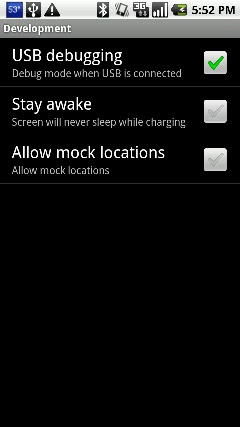
Phone Settings – Another troubleshooting step is to make sure the phone is setup for the USB connection. To do this all you have to do (on the phone) is:
Settings -> Applications -> Development -> USB Debugging (Make sure it is checked)  That’s it!

Once you have it installed there are a few cool things you can do with it. Let’s say you want to make a backup of all the apps on your phone.  All you have to do is key in this command:

adb pull /data/app ./

This will backup all the .APK files so you can reinstall them at a later time.  So now lets show you how to do the restore.  Put your APK files all into a single folder (c:apps), navigate to that folder and type in this command:

adb install *.apk

How about changing your boot logo?  Easy as can be…  Find a boot animation on the web that you want to use, and make sure it is a .ZIP file (that you have no need to open or modify, because it probably won’t work if you do) and rename it bootanimation.zip.  Copy the bootanimation.zip file to your “Tools” folder inside your Android SDK installation.  Finally type the following 2 commands to copy it to the phone:

adb shell mount -o rw,remount /dev/block/mtdblock3 /system
adb push pirate_bootanimation.zip /system/media/bootanimation.zipck/mtdblock3 /system
adb reboot

 Watch the phone screen and you should see the new boot logo!

So this is a brief look at what ADB does, and how to get it.  For more information check out the official Android ADB site and learn all you can on it.  Also remember to backup before messing around too much.  We are not responsible for data loss!


Some “Best of the Best” accessories for your Android phone:

Keyboard Options

Typing on an all touch keyboard can be a chore to learn, especially if you have a phone that is all touch. Every manufacturer has their own keyboard they use so it can even be confusing if you upgrade phones.  Most phones also have the stock android keyboard installed, so if you decide to try that you can easily switch to it and try it out. But how?
To switch keyboards all you have to do is go into an app that has a spot to type, for example I will use the “Messaging” app. Simply press and hold on the area where you would be typing and look for a popup that says “input method”. When you choose that it will give you a list of installed keyboards.

So what if it doesn’t show any keyboard installed? First double check in your settings menu under “language and keyboard” and see what is listed there. If there isn’t a check mark next to an option, it won’t show up in the “input method” list.

So now you are probably asking yourself, “Where can I try out more keyboards?”. And the answer to that lies in the rest of this post.  Here are a few keyboard apps to try out and see what you think.  (Plus a bonus Amazon Appstore free keyboard of the day for 7/21/11.)

Name: SwiftKey X
Description:
SwiftKey X is a next-generation AI keyboard, now with unrivaled prediction and personalization.

SwiftKey X for smartphones builds on TouchType’s SwiftKey keyboard to offer cloud personalization, a new prediction engine, and a host of new UI improvements.

Using artificial intelligence breakthroughs, the SwiftKey X keyboard accurately predicts your most likely next word based on what you’ve already written. It can also scan your sent messages, and learn as you use it to make predictions even more accurately over time. The more you get to know your SwiftKey keyboard, the more it will get to know you.

Download Link: http://goo.gl/VwvNj (Amazon)

Name: Keyboard from Android 2.3
Description:
If your phone isn’t updated to gingerbread yet you can get the keyboard from 2.3 and load it right on your phone.
Features:
1. Multitouch keyboard
2. User dictionary, built-in dictionary
3. Auto correction
4. Redesigned and optimized keyboard layout and style
5. Speech to text
6. Split main keyboard app and dictionaries.
Download Link: http://goo.gl/ms99g

Name: Better keyboard 8
Description:
Better keyboard is the best and the most popular keyboard on the android market
Supports many languages:
Arabic, Czech, Danish, Deutsch, English, Espanol, Finnish, French, Hungarian, Hebrew, Italiano, Korean, Netherlands, Norwegian, Norwegian (Bokmål), Polish, Portuguese, Russian, Slovenian, Swedish
Download Link: http://goo.gl/gbEBT

Name: Perfect keyboard
Description:
Take command of your Android device’s touchpad keypad with a Perfect and smart Keyboard for android. You can customize the look of the keyboard with eight different themes and add additional functionality to your device. Perfect Keyboard lets you use custom dictionaries, control background and text colors, and adjust the keyboard’s vibration density. In short, Perfect Keyboard allows you to setup your Android phone or tablet’s touchpad keyboard so that it works best for you.
Note: Perfect Keyboard works only on Android 2.2 and up
Download Link: http://goo.gl/W9BSX

Name: Swype Beta
Description:
-Swype v3 introduces two major new features: Tap Correction and Horizontal Word Choice List
-Our Tap Correction engine utilizes many of the concepts that make swyping so accurate. Seamlessly go from typing to swyping and back without missing a beat!
-The Horizontal Word Choice List replaces our popup word choice window, giving users an experience more in-line with evolving Android standards. It also makes dictionary control and word selection faster and easier.
-Swype v3 is available for devices with HVGA, WVGA, FWVGA, QVGA, WQVGA, WSVGA, qHD screen sizes
-Introducing a special Honeycomb-only WXGA version for Android tablets, with features like “moveable keyboard” that you won’t find anywhere else!
-To see which languages are supported on your device, check the language and resolution table
-Improved licensing: Swype will no longer be disabled after a reboot on some devices; added support for devices that don’t have a cellular radio (wifi-only tablets); no more license failures for CDMA devices in airplane mode.
-Simplified registration by allowing users to authenticate their email address directly through the installer
-Too many other improvements to list! Download Swype v3 NOW to explore everything the next generation of Swype has to offer!
-Limited End User Support – mostly via our forum
-If your phone came pre-installed with Swype
-DO NOT download this beta (it won’t work)
Download Link: http://goo.gl/1yfdg

Some “Best of the Best” accessories for your Android phone:

Deluxe Ultra Voice Changer – Free Amazon Appstore App for 7/20/11

Haven’t you ever wanted to be able to change your voice to make it sound like a robot, alien, chipmunk, robot, or simply add echo, or make it sound all metallic. Plus did I mention you can make it sound like a robot? As a robot I have all these sounds built it, but for you humans all you have to do is download today’s Amazon free app of the day. If you grab this download today you get it for free, saving yourself a whole american dollar.

Name: Deluxe Ultra Voice Changer
Description:
Tired of the sound of your own voice? Find a new one with Deluxe Ultra Voice Changer, a fun vocal-effects app for your Android device. Enjoy 23 different voice effects in this deluxe version.

Hear yourself talk like an alien, robot, or chipmunk; play your voice backwards, sped up, slowed down, with an echo, or by using other effects. Crack yourself up or weird out your friends and family–it’s easy and fun.

23 Voices, Endless Fun

Creating crazy new voices is simple with Deluxe Ultra Voice Changer. The recording process is user friendly, and a detailed Help page answers any questions you may have as you explore all the app’s options. (For example, if you hear excessive static during playback, a helpful tip suggests that you lower your recording volume and try again.)

Keep in mind that a one-minute audio file created by this app will be about 1.3 megabytes in size. Unless you’re on an unlimited data plan with your carrier, you may want to minimize sending audio recordings via e-mail when using this app.

Download Link: http://goo.gl/KUAyq

Some “Best of the Best” accessories for your Android phone:

JogTracker Pro – Free Amazon Appstore App of the Day

I am actually excite to try this app out.  I want to do a comparison verses the Nike+ watch and chip in the shoe thing.  I know that the Nike+ thing isn’t very accurate compared to the treadmill, or actually on a path that has the distance marked.

I will do the comparison test and keep you all posted.

Name: JogTracker Pro
Description:
Keep track of your distance in miles or kilometers. Use GPS and Google Maps to help you find your way. View your jog history on the Web. Share your progress on Facebook and Twitter. Listen for voice prompts at intervals.
Download Link: http://goo.gl/vMQxU

Some “Best of the Best” accessories for your Android phone:

New Android Market

I stumbled across a way to update your Android Market to the new version.  (See awesome screenshot below)

Name: Updated Android Market
Description:
To get the update all you have to do is download the correct .APK file. I have linked to it below,or through the QR code to the left. The file is hosted through Mediafire. I have heard reports of it working with both rooted and nonrooted phones. Simply download and install the APK file and when you open the Android market it will look like the new menu.
You will now see that it is broken down a little more and has the “Books” and “Movies” categories. This has been a common complaint as I have searched by keyword and had all of the ebooks lumped in with all the games, so hopefully this will correct things. So load it up and see what you think if you don’t want to wait for the update to come into your phone on it’s own…
Download Link: http://goo.gl/wctRe

Some “Best of the Best” accessories for your Android phone:

Sinister Planet – Free Amazon Appstore App of the Day 7/16/11

Name: Sinister Planet
Description:
You have worlds to conquer
Blast your way through wave after wave of relentless alien hordes and destroy increasingly challenging planets in this action-filled app for Android. Beautifully rendered meteors and retro-style graphics transport you back to the heyday of arcade classics in Sinister Planet.

Mission Objective
Your objective is to attack and destroy a series of alien worlds, progressing toward the ultimate challenge: Planet Sinister. To destroy each world you have to attack the surface and take out the power grid protecting the planet’s core. To aid you in your quest, you have the opportunity to upgrade your ship’s weapon systems by collecting power-ups (in Arcade mode) or amassing gold (in Battle mode).

As you progress through the waves, you will find yourself needing those upgrades as more deadly enemies are introduced. Upgrades available include extra laser pods to double or triple your firepower, ECM attacks (aka Smart Bombs), turrets for 360-degree shooting, and more.

Make little ones out of big ones
Collect the Gems
To make it through each wave, collect the gems produced as you blast the asteroids out of the sky. Don’t worry, the asteroids won’t hurt you, but you will face a different challenge–your enemy just loves to grab those gems too. Make sure you reach them first, and shoot them quickly, or they will be transformed into much more dangerous foes.

As a welcome respite from the hard-core destruction, you get the chance to gain bonus points by completing the challenge waves. Aliens will fly in formation around your ship while you attempt to execute a complete wipe-out. It’s not easy, but getting the right upgrades will greatly aid your mission. During the challenges your ship gains temporary indestructibility.

Download Link: http://goo.gl/5fS2R

  Some “Best of the Best” accessories for your Android phone:       

iCookbook – Amazon Appstore Free App for 7-14-11

Not only is it the free app of the day today, this previously apple exclusive is launching on Android today, exclusively on the Amazon Appstore. 

If you are someone that loves technology and loves to cook, than this app is for you.  This app gives you a full cookbook at your fingertips with all the benefits of an ebook like the ability to search and a cool feature called stir.  Stir takes the featured recipes and refreshes them with a fresh list, so if you are looking for something new to make it gives you some fresh ideas.

After today the cost of this app will jump up to it’s normal price of $4.99.  So try it out. It can’t hurt since it is free, but remember that it is only availabe today for free!

Amazon Appstore Free App of the Day – Paper Glider (7/10/11)

Although the ratings weren’t all that great I did give it a try this morning.  It is really just a game where you glide a paper plane past various backgrounds.  It does have some cool power ups and the graphics are nice, but I got bored of it after a few minutes.  Definitely worth a try for the low low cost of FREE – But remember, it is only free today  7/10/11.
From Amazon:

Some “Best of the Best” accessories for your Android phone:

Welcome Post

Starting today I decided to share some Android info. As an old bot I have spent my life as an android, so you can expect to see the best and most accurate info in the world posted right here on this site.

I plan to cover everything from how to use your Android device to how to hack your Android device, plus all things in between.  I will share with you some apps that might help you be more productive, or just have a little fun.

So be ready for a lot more, and if you like what you see click the “RSS Feed” link at the top, or copy and paste the link into your favorite RSS reader (like Google Reader).